Chapter 6 — The Five Rules of Self-Custody
In Chapter 4, you learned how private keys, signatures, and permissions determine who can control your Vaulta account.
In Chapter 5, you learned how wallets and Authenticators manage signing credentials, and why separating highly protected recovery credentials from everyday credentials matters.
Now comes the most important responsibility of blockchain ownership: protecting your own access.
Before creating your Vaulta account, you should understand five security rules, the most common ways people lose their cryptocurrency, and how to prepare for recovery if something goes wrong.
What does self-custody actually mean?
With a traditional bank account, you can normally contact your bank if you forget your password. The bank can verify your identity and restore access through its internal systems.
Self-custody works differently.
Your Vaulta account exists on the blockchain. Control over it depends on satisfying its on-chain permissions, typically by using private keys or other authorized credentials.
Blocksfinity is a non-custodial platform. It provides tools for interacting with Vaulta, but it does not hold your assets or keep backup copies of your private keys.
According to the official Blocksfinity FAQ, Blocksfinity cannot:
Restore private keys that you have lost without a backup.
Reset or recover your forgotten Authenticator master password.
Recreate a lost or defunctional passkey.
Reverse a mistaken blockchain transaction.
That does not mean losing one device or password must permanently lock you out. If you have prepared another valid credential or recovery mechanism, you may still regain control.
But if every usable credential and recovery path is lost, nobody can simply reset your Vaulta account for you.
Key idea: Self-custody gives you direct control over your blockchain account. It also makes you responsible for protecting and recovering that control.
Rule 1 — Never share your private key or recovery credentials
Your private key is not an ordinary password. It is a cryptographic secret capable of creating signatures for whichever Vaulta permissions recognize its corresponding public key.
If someone obtains your private key, they may be able to authorize transactions or change account permissions.
Never send private keys, recovery phrases, recovery certificate encryption words, or Authenticator passwords through chat, email, or support messages. Avoid keeping unencrypted copies in screenshots, ordinary notes, or cloud folders.
Your public key and Vaulta account name are different. They can be shared because they do not, by themselves, grant signing authority.
You may eventually need to import a private key into a trusted Authenticator. That is different from giving the key to another person or entering it into an unverified website.
Important: Someone claiming to be a Blocksfinity Support Agent does not need your private key, master password, or recovery credentials to investigate an account problem.
Rule 2 — Recognize phishing, fake support, and compromised devices
Not every attack involves sophisticated hacking. Many attacks simply convince users to give away their credentials or approve something dangerous.
Phishing and fake support
Phishing means tricking someone into trusting a fraudulent website, application, or message.
Imagine receiving this message:
"Your Vaulta account has a security problem. Visit the Blocksfinity website immediately and enter your private key to restore access."
The link to the website and the website itself may look almost identical to a legitimate service, like Blocksfinity. It may even display familiar logos and account information.
But entering your key could give an attacker control over your account.
Common warning signs include unexpected private messages, urgent security warnings, suspicious links, fake support representatives, and applications downloaded from untrusted sources.
Open trusted websites through bookmarks or addresses you have verified independently, rather than clicking links sent by strangers on social media chats, email or other common communication channels.
Clipboard malware
Clipboard malware can manipulate information you copy and paste.
Suppose you copy a Vaulta recipient account name and paste it into a transfer form. Malware could replace it with an account controlled by an attacker.
You might not notice unless you check the final recipient.
Always verify the recipient account, network, token, and amount (displayed in your trusted Authenticator) before signing—not just before copying them.
Compromised computers and phones
Malicious software, browser extensions, or remote-access tools can also compromise signing credentials.
Use updated software, trusted applications, strong device security, and avoid managing valuable blockchain accounts on shared or untrusted computers.
A password-protected Authenticator reduces exposure, but it cannot guarantee safety on a compromised device.
Key idea: Even correctly written-down private keys are not safe if you enter them into malicious software or expose them on an infected device.
Rule 3 — Always verify what you are signing
In previous chapters, you learned that a digital signature can prove authorization without revealing your private key.
But there is an important distinction:
A signature proves authorization. It does not prove that the requested action is safe.
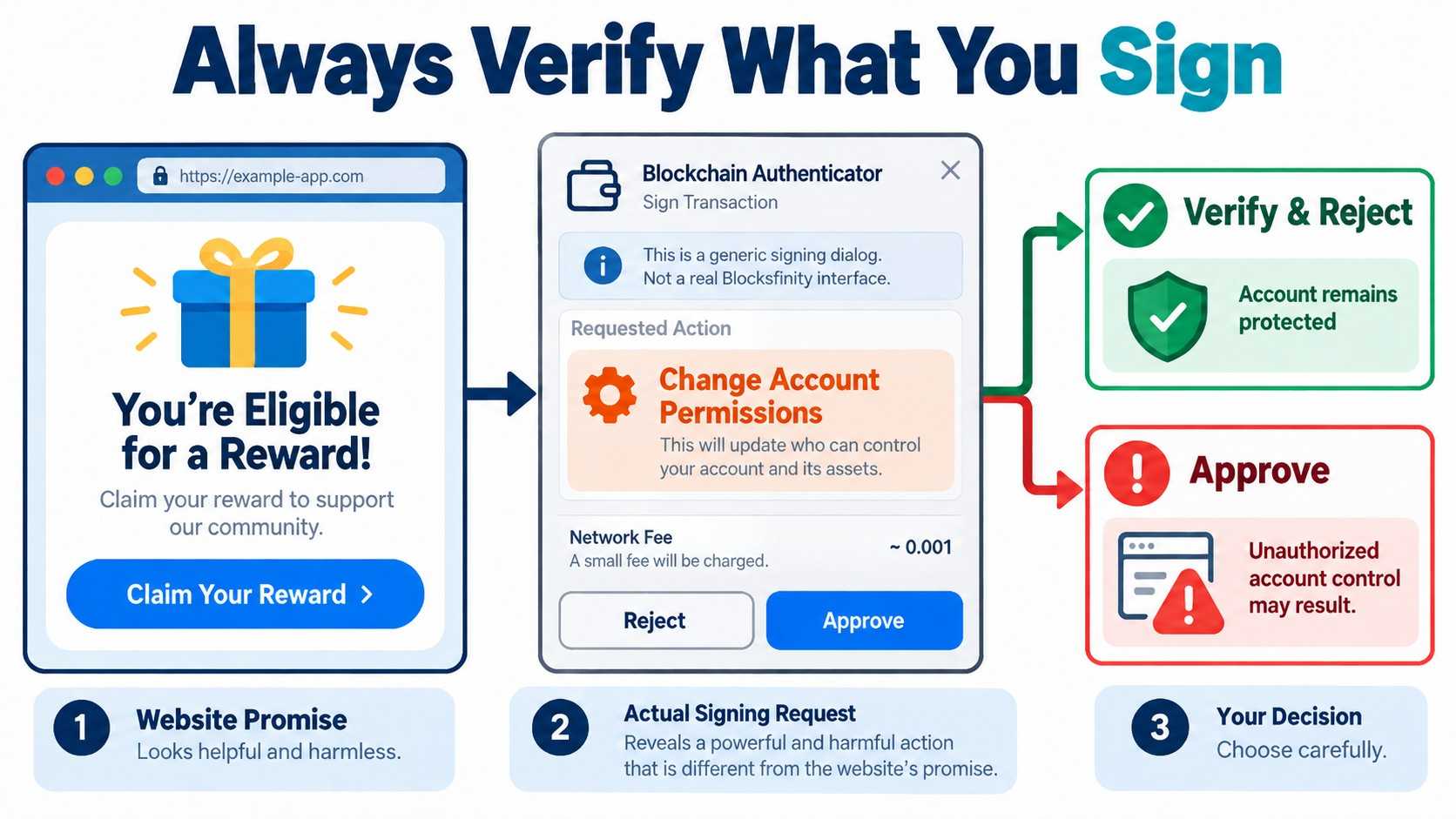
For example, a signing request might authorize:
A transfer of $A to another account.
An interaction with a smart contract.
A change to your account's
activepermission.A change to your powerful
ownerpermission.
A malicious application could describe something as a reward, login, or account verification while requesting a transaction with entirely different consequences.
Before approving a blockchain transaction, verify in your trusted Authenticator before you sign:
Account and permission: Which Vaulta account is signing, and is it using
owneroractive?Action and contract: What exactly will the blockchain execute?
Recipient and values: Which account, token, amount, or permission settings are involved?
Entire transaction: Are there additional actions beyond the one you expected?
Remember that logging in and broadcasting a blockchain transaction are not necessarily the same thing. An authentication signature may only prove account control, while a transaction signature can authorize changes to blockchain state.
If your Authenticator cannot display enough information for you to understand an unfamiliar request, do not approve it until you can independently verify what it does.
Why irreversible transactions matter
Once a valid transaction is executed and finalized on Vaulta, Blocksfinity cannot simply delete or reverse it.
If you send tokens to the wrong account, the recipient may voluntarily send them back. However, you cannot rely on that happening.
Some smart contracts may provide specific correction mechanisms, but there is no general customer-support undo button.
Important: A malicious contract action can be properly signed and successfully executed. The blockchain checks authorization and rules, not whether somebody tricked you into approving the action.
Rule 4 — Maintain a secure, independent recovery mechanism
Consider a few situations:
Device or operating system failure: Your computer or phone is lost, stolen, damaged, or stops working. A hard drive fails, your operating system crashes, or you must reinstall it. Even if your files are recovered, your Authenticator, local keys, or passkeys might not be.
Authenticator or browser problems: You forget your Authenticator master password, its encrypted vault becomes corrupted, or a software update breaks the application. Your browser stops working, its profile gets deleted, or you accidentally erase application data. Your credentials may become inaccessible or permanently lost.
Lost credentials or backups: You lose your private key, encrypted key certificate, encryption words, hardware security key, or access to your password manager.
Security breaches: Malware steals your private key, you enter it into a phishing website, or you accidentally approve a malicious permission change. You might still have access, but an attacker could now control your account too (the permission you worked with).
In each situation, recovery depends on what you prepared beforehand.
Possible recovery paths include a securely backed-up private key, another already-authorized credential, or a separate protected owner authority.
Blocksfinity Authenticator also supports encrypted key certificates as a restore process.
A certificate can protect a backup of an existing private key. Recovering it requires the certificate and its six encryption words. Those components should be stored securely, preferably separately.
Remember that a certificate backs up a key; it does not automatically create a second independent on-chain permission.
For stronger security, your owner and everyday active credentials should eventually use different keypairs. This allows the highly protected owner authority to replace a compromised active credential.
We will explore separate keypairs, secure backups, and account recovery in greater detail in the upcoming missions.
Avoid a single point of failure
A backup is not truly independent if the only copy is stored on the same computer as your Authenticator.
If that computer fails, both may disappear.
Similarly, storing every recovery credential in one accessible location creates unnecessary theft risk.
Ideally, maintain protected backups in separate locations, with enough information to identify the relevant account and permission.
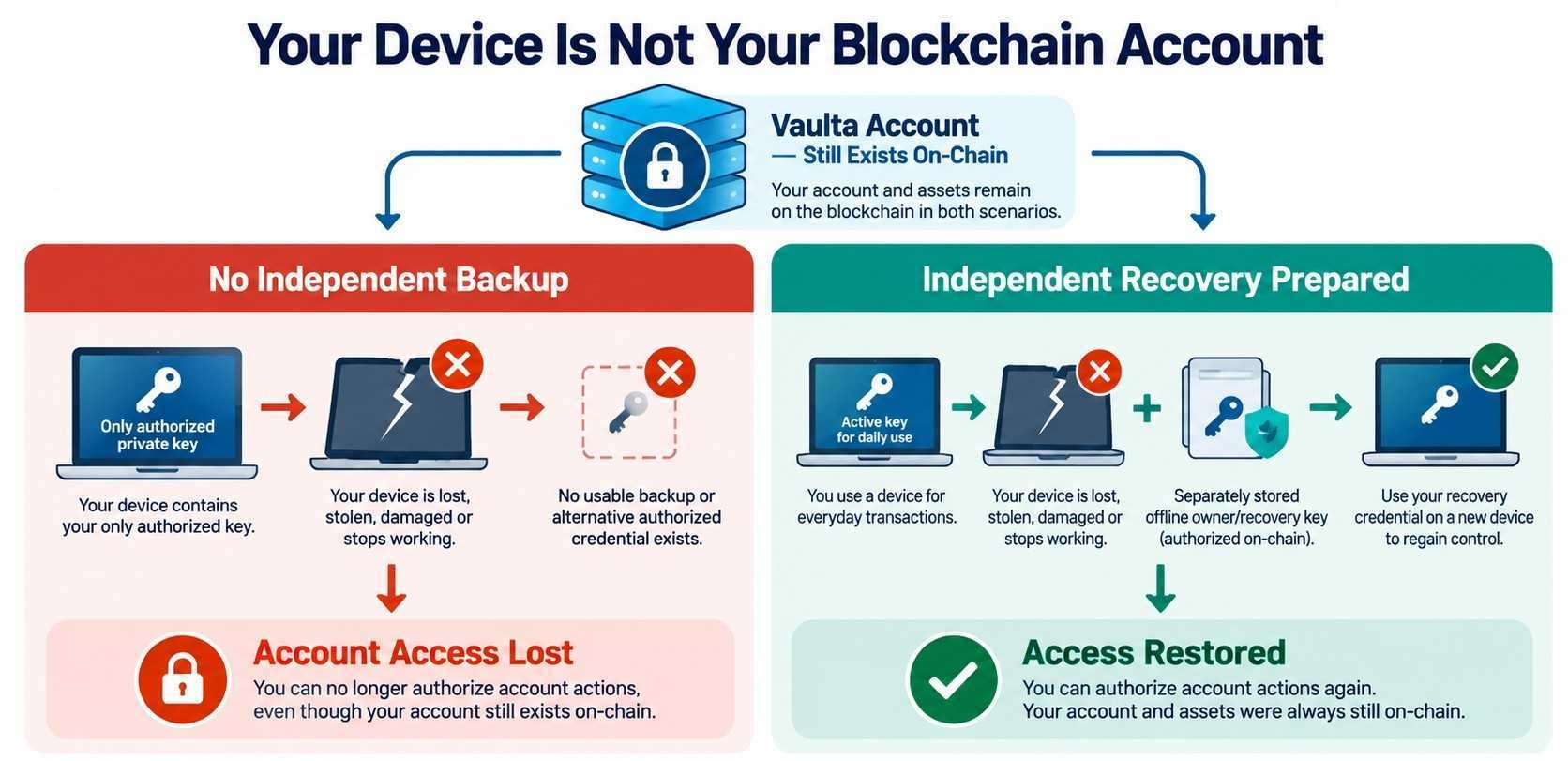
Key idea: Recovery is not customer support resetting your account. It is using a private key, key certificate backup, or authorization mechanism that you already prepared and still control.
Rule 5 — Test recovery before depositing significant funds
Creating a backup does not automatically mean the backup works.
You might discover later that a private key was copied incorrectly, an encryption word was recorded incorrectly, or a backup belongs to an old key that no longer controls your account.
The safest time to discover these mistakes is before the account holds meaningful value.
After creating your account, you should eventually demonstrate that you can:
Access your recovery materials independently of your everyday device.
Restore the intended credential in a trusted environment without destroying your only working copy.
Confirm that its public key matches the expected key in your Vaulta account's current on-chain permissions.
Regain the intended access and verify that the recovery method works.
This is precisely what you will practice later in the dedicated recovery mission.
Also remember that changing a permission or replacing a private key can invalidate an older backup. Recheck recovery after important security changes.
Important: Do not deposit substantial funds simply because you believe your backup is safe. First verify that you can actually recover control.
A quick warning about common cryptocurrency scams
One particularly widespread scam promises:
"Send 100 $A to this account and automatically receive 103 $A back. It's a special investment promotion or blockchain test."
Scammers may impersonate exchanges, advertise arbitrage profits, or claim that sending real tokens is necessary for a testnet experiment. They may even return a small initial payment with a bonus to gain your confidence before stealing a much larger deposit.
A successful small test does not prove that a scheme is legitimate. Real mainnet tokens sent to a scammer remain real transfers, regardless of whether the recipient account contains words such as testnet, official, or exchange.
Other common scams include fake airdrops asking you to sign malicious actions, fraudulent investment platforms showing fictional profits, romance-based investment scams, fake support or recovery services demanding advance payments, and fraudulent token projects designed to take investors' money.
Never send cryptocurrency merely because someone promises to return more, unlock a reward, or release supposedly frozen funds.
For an example involving EOS/Vaulta accounts, see How Scammers Trap Victims in Fake Deposit Schemes and EOS Testnet Scams.
Before creating your Vaulta account: Readiness checklist
In the next practical exercise, you will create your Vaulta account.
Before proceeding, confirm that you are prepared:
Trusted device: I am using a secure, updated computer or phone, without suspicious extensions or remote-access software.
Secure backup location: I have decided where to protect my private key and recovery materials, independently of my everyday device.
Account name: I understand that the account name and its on-chain activity are publicly visible.
Recovery responsibility: I understand that after creation I must securely save my credentials, prepare and test recovery, and avoid depositing meaningful funds until I have done so.
You do not need to master every security tool before creating your first account. The practical missions will guide you through the process.
But you should already understand which responsibilities cannot be delegated to a Support Agent.
What you should remember
Never disclose your private keys, recovery credentials, or Authenticator master password. Legitimate support does not need them.
Treat websites, applications, devices, and signing requests as potential attack surfaces. Verify before trusting or approving.
Blockchain transactions can have irreversible consequences. A valid signature does not mean an action was safe or intentional.
Protect your recovery authority independently of your everyday device. Losing a password or passkey should not be your only remaining route to the account.
Test recovery before committing significant value. An untested backup is only an assumption.
The goal is not to make you afraid of blockchain technology, but to help you use it safely and confidently.
The better you understand how your account works, what could go wrong, and how common scams operate, the easier it becomes to recognize warning signs and avoid costly mistakes.
Knowledge is your strongest defense. Scammers often target people who are unfamiliar with the technology and its risks. People who understand how blockchain works and recognize common scam tactics are much harder to deceive and far better equipped to protect themselves.
Quick Quiz
1. Someone claiming to be Blocksfinity support asks for your private key to repair an account problem. What should you do?
A. Share the key if the person knows your account name.
B. Share only the first half of the private key.
C. Refuse and verify the issue through an independently confirmed official support channel.
D. Send the key if the support representative promises to delete it afterward.
2. Someone offers to return 103 $A if you first send them 100 $A. They previously returned a small test payment with a profit. What does this prove?
A. The offer is safe because the test worked.
B. Nothing about the legitimacy of the scheme; the small return may be intended to gain your trust.
C. Vaulta guarantees the larger payment will also be returned.
D. Transactions are reversible when a promotion fails.
3. Why should you inspect a transaction before signing it?
A. Because signing can authorize transfers, permission changes, or smart-contract actions with real consequences.
B. Because the blockchain automatically reverses anything you did not intend.
C. Because a transaction signature only proves that you visited a website.
D. Because any transaction from a familiar-looking website is safe.
4. Your computer is lost and you have forgotten your Blocksfinity Authenticator password. Which statement is correct?
A. Your Vaulta account automatically disappears.
B. Blocksfinity can reset your private key after checking your identity.
C. Your tokens are automatically transferred to a new account.
D. You may regain control if you still have the private key, a key certificate backup or another authorized recovery path.
5. Which is the strongest evidence that your private-key recovery backup works?
A. You remember creating the backup.
B. You stored a screenshot of the backup on your everyday computer.
C. You successfully restore the credential in a trusted environment and verify that its public key matches the appropriate current on-chain permission.
D. Your Authenticator currently opens without problems.
Answer footnote: Q1:3; Q2:2; Q3:1; Q4:4; Q5:3.
Last updated:
Was this article helpful?
Have a specific question about this article?