Mission 1 — Become a Blockchain Detective
A blockchain explorer lets you investigate the Vaulta blockchain without controlling the account you are looking at. In this mission, you will start with a known example, repeat the investigation on your own account, and then inspect another account.
By the end, you should understand what blockchain transparency means in practice: much of an account's on-chain activity can be independently inspected without asking the account owner for access.
Key idea: Looking at blockchain data is not the same as controlling an account. In this mission, you are observing—not signing or changing anything.
Before you start
This mission is read-only.
You should not need to enter a private key, recovery credential, or master password.
Never paste a private key into an explorer search field. A private key is secret signing authority. A public key is designed to be public.
Also remember that the screenshots in this guide capture the account at a particular moment. Balances, resources, and transaction history may change after the screenshots were taken.
Part 1 — Investigate the example account
We will first investigate the Vaulta account:
supportacc1f
Open:
https://www.blocksfinity.com/account/info/supportacc1f
You can also search for supportacc1f from Blocksfinity Explorer.
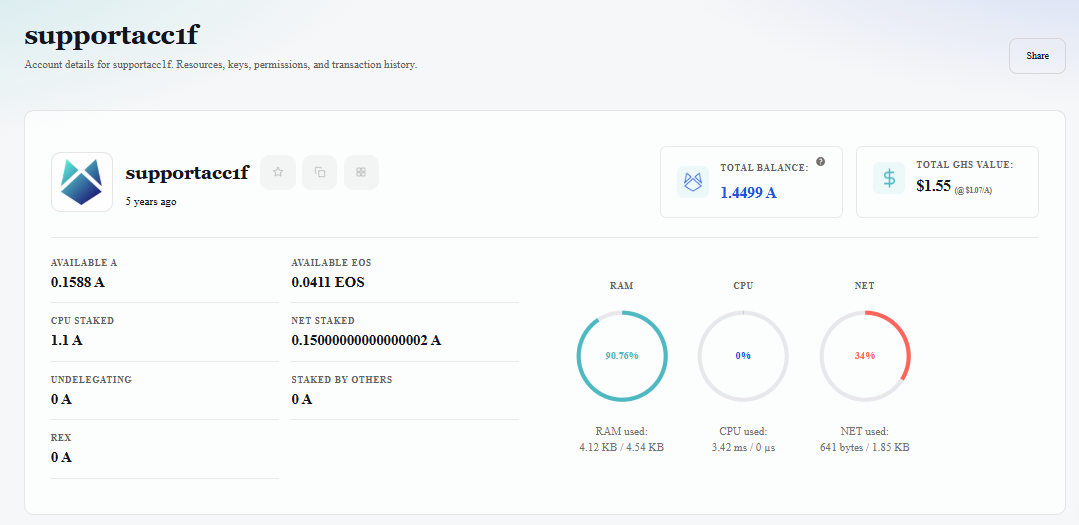
Step 1 — Identify the account and its balance
Start with the account overview.
Find:
the account name;
the total balance shown by Blocksfinity;
the available token balances;
the RAM, CPU, and NET resource information.
Do not assume an account has only one type of token. The summary and the individual token holdings may show different information.
Step 2 — Inspect the account resources
RAM — storage space used for data that must remain on the blockchain. For example, account, token balances or smart-contract data may consume RAM.
CPU — processing capacity used when the network executes actions for the account.
NET — network bandwidth used to transmit transaction data through the blockchain network.
In Vaulta, these are blockchain resources, not the physical RAM, processor, or internet connection of your computer.
In the example screenshot for supportacc1f, Blocksfinity shows:
RAM:
70.73%used — approximately3.73 KB / 5.27 KBCPU:
0%usage at the moment shownNET:
0%usage, with approximately1.85 KBavailable according to the displayed meter
The circular indicators make it easy to see how much of each resource is currently being used. RAM is noticeably different in this example because part of the account's allocated storage is already occupied, while the displayed CPU and NET usage is currently zero. So this account would need a “CPU/NET power up” first or someone needs to pay for those ressources when the account wants to do an action.
Key idea: Tokens are assets held by the account. RAM, CPU, and NET are resources the account can use when storing data or performing blockchain actions.
Step 3 — Inspect the token holdings
Scroll to Chain Data and open Tokens.
This gives you a more detailed view of token holdings associated with the account. In this example we can see the account holds, next to the $EOS which were visible in the image before, 0.1588 $A, 1 $MORTYS, 0 $POOR and 1 $V tokens:
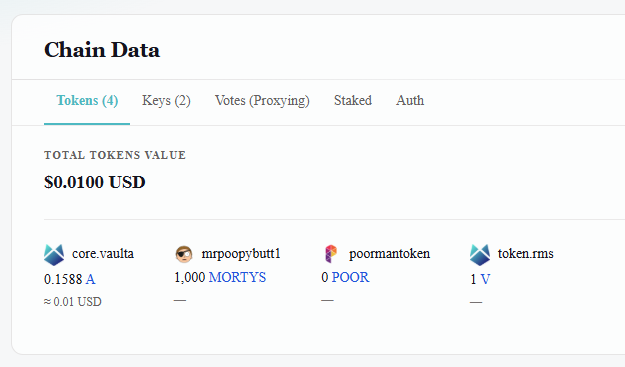
The important lesson is not the exact amount shown in the screenshot. It is that the balance can be independently inspected through the explorer.
Step 4 — Find the permissions and public keys
Inside Chain Data, open Keys.
Identify:
the
ownerpermission;the
activepermission;the public key associated with each permission.
You learned earlier that these permissions have different roles. owner is the highest-level authority, while active is normally used for day-to-day actions.
The explorer can display the public keys associated with these permissions.
It should never display the corresponding private keys.
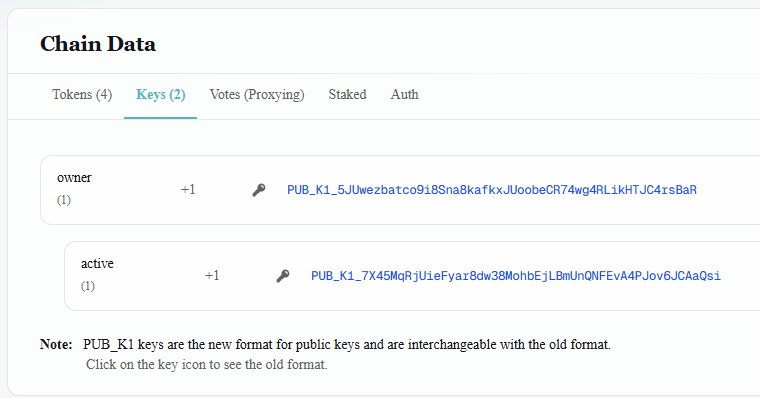
Key idea: Seeing somebody's public key does not give you their signing authority. The corresponding private key is what must remain secret.
Part 2 — Follow a transaction
Now move from the account itself to its activity.
Step 5 — Find the latest transaction
Scroll to Transactions.
Before deciding which transaction is the latest, check that you have not accidentally applied a contract, action, date, token, or transaction-type filter.
Use the refresh control if necessary.
Look at the newest visible transaction and record:
transaction ID;
date and time;
action;
accounts involved;
amount or other visible action data.
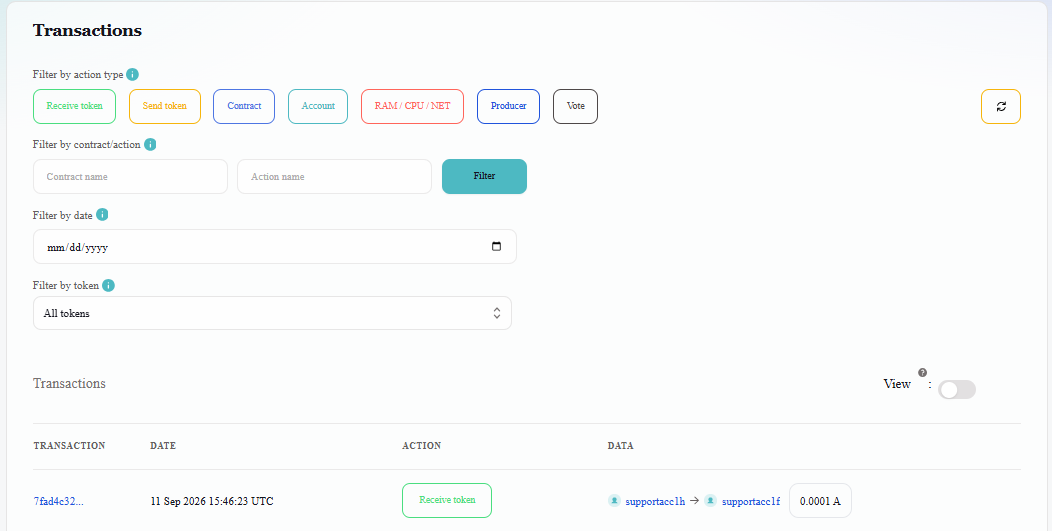
A transaction ID, often shortened to TX ID, is the identifier you can use to follow that specific transaction. Its the blue number on the left: 7fad4c32...
Step 6 — Open the transaction
Click the transaction ID.
You should now be looking at the transaction itself rather than the account's complete history.
Find:
transaction ID;
block number;
block time;
CPU usage;
NET usage;
actions;
authorization;
transaction data.
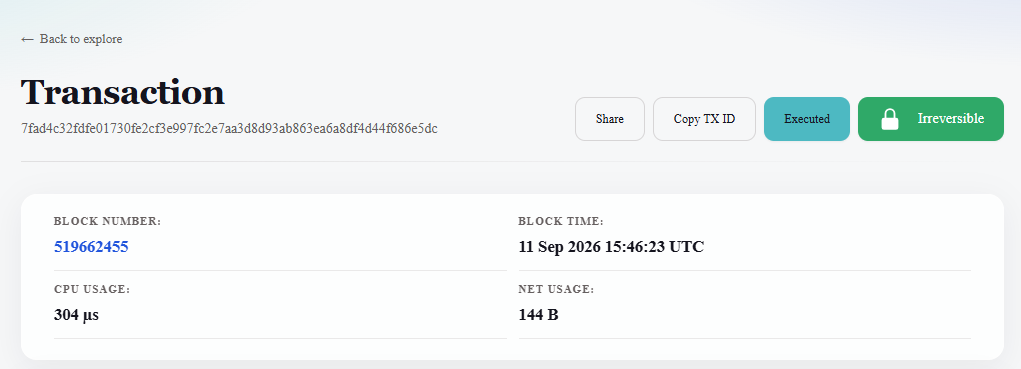
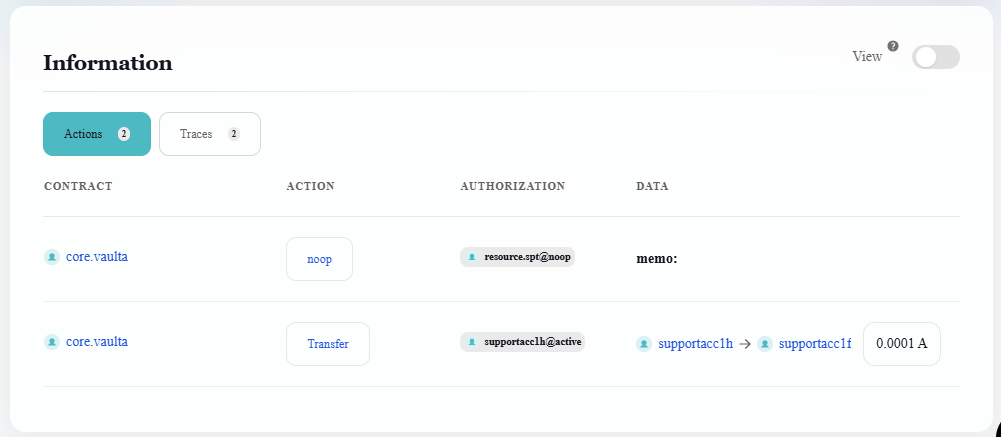
In the supplied example, the transaction was recorded in block:
519663724
Do not treat that number as a permanent property of the account. It belongs to this particular transaction.
Step 7 — Find the block containing the transaction
Click the block number 519662455 from the transaction page.
You have now moved one level deeper into the blockchain record.
Find:
block number;
block ID;
producer;
timestamp;
previous block;
next block;
transactions contained in the block.
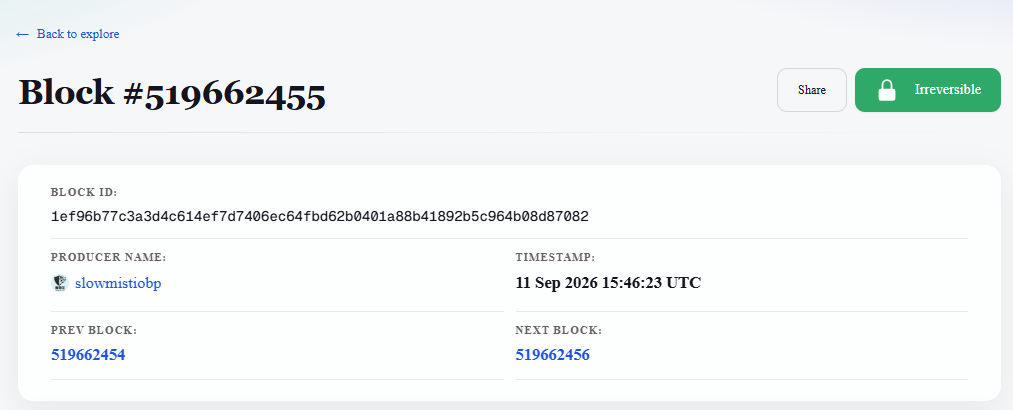
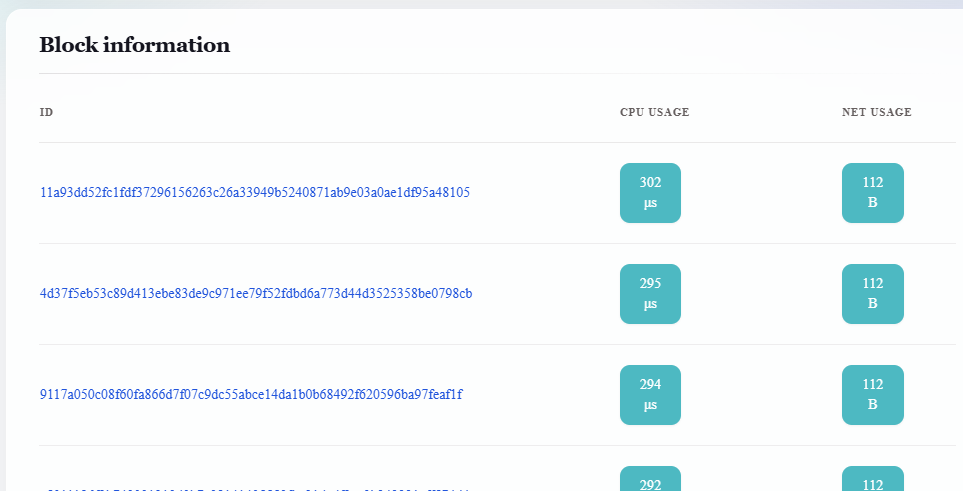
You have now followed the evidence:
Account
   ↓
Transaction History
   ↓
Transaction ID
   ↓
Block
   ↓
Blockchain history
Key idea: A transaction does not exist as an isolated entry on a website. It was processed by the network and recorded as part of a block in the blockchain.
Part 3 — Investigate your own account
Now repeat the investigation using your Vaulta account.
Check:
account name;
total balance displayed;
RAM;
CPU;
NET;
individual token holdings;
ownerpermission;activepermission;public key or keys shown for those permissions;
latest transaction ID;
transaction timestamp;
block number containing that transaction.
Part 4 — Investigate somebody else's account
Now search for another Vaulta account.
This could be another participant's account, an account supplied by the facilitator, or another account name you already know.
Other examples:
The official deposit account of the Bybit Exchange: https://www.blocksfinity.com/account/info/bybitdeposit
Special Vaulta (EOSIO) System level accounts:
https://www.blocksfinity.com/account/info/eosio (system account with a smart contract)
https://www.blocksfinity.com/account/info/eosio.prods (the producer-governance authority account)
Repeat part of your investigation.
Can you find:
its token holdings;
its permissions and public keys;
its resources;
a recent transaction;
the block containing that transaction?
Compare it with your own account.
What is different?
What blockchain transparency actually means
You have just inspected information about accounts without receiving passwords or private keys from their owners.
That is an important property of a public blockchain.
However, public does not mean that every account automatically reveals the real-world identity of the person controlling it. An account name, public key, balance, or transaction can be visible without telling you who the human owner is.
It also does not mean that private keys are public.
Think of the distinction this way:
PUBLICLY OBSERVABLE

Account
Balances
Permissions
Public keys
Resources
Transactions
Blocks

        ≠

SECRET AUTHORITY

Private keys
Recovery credentials
Authenticator passwords
The Blocksfinity Explorer is the interface you used to investigate this information. The underlying account and blockchain history exist on Vaulta, not inside the Blocksfinity webpage.
Mission complete
You have completed the mission when you can start with an account name and independently trace:
Account
   ↓
Balance + Resources
   ↓
Permissions
   ↓
Public Keys
   ↓
Transaction
   ↓
Transaction ID
   ↓
Block
Then repeat the investigation for an account that you do not control.
What just happened?
In this mission you did more than browse a website:
Blocksfinity presented publicly observable Vaulta blockchain information.
No private key or account permission was required to inspect that information.
You did not sign or broadcast a transaction.
Your investigation did not change Vaulta's blockchain state.
You traced a relationship from an account to a transaction and from that transaction to the block containing it.
That is blockchain transparency in practice.
What you should remember
An explorer lets you inspect blockchain activity without controlling the account.
Public keys can be visible; private keys must remain secret.
Transactions can be traced from an account to a TX ID and then to the block that recorded them.
Public blockchain information does not automatically reveal the real-world identity behind an account.
Blocksfinity is an interface for viewing the data; Vaulta is the blockchain where the account and history exist.
Quick Quiz
1. What happened on Vaulta while you were simply inspecting an account in Blocksfinity?
A. A transaction was created.
B. Nothing changed on-chain; you were reading existing information.
C. Your active permission signed the request.
D. Blocksfinity temporarily took control of the account.
2. Which item must remain secret?
A. Account name
B. Public key
C. Private key
D. Block number
3. Before calling the first transaction in the list the account's "latest transaction," what should you check?
A. That transaction filters are not hiding newer activity.
B. That you are logged in with the
ownerpermission.C. That CPU usage is zero.
D. That the account has only one token.
4. How do you find the block that contains a transaction?
A. Search using the account's private key.
B. Look at the token balance.
C. Open the
ownerpermission.D. Open the transaction and follow its block number.
5. You can see another account's balance, public keys, and transaction history. What does this prove?
A. You can control the account.
B. Certain account information is publicly observable on the blockchain.
C. You know the legal identity of its owner.
D. You know its private key.
Answer footnote: Q1:2; Q2:3; Q3:1; Q4:4; Q5:2.
Last updated:
Was this article helpful?
Have a specific question about this article?