Mission 3 — Understand Blockchain Resources
Every transaction on Vaulta uses network resources. Unlike blockchains that present everything to the user as a single transaction fee, Vaulta exposes three different resources: RAM, CPU, and NET.
In this mission, you will inspect your account's resources, see why traditional CPU/NET allocation is no longer the practical way to obtain transaction capacity, use PowerUp, verify the resulting CPU and NET, buy additional RAM, and confirm changes on your account.
Understand your account resources
Open your account in Blocksfinity https://www.blocksfinity.com/account and look at the three resource indicators: RAM, CPU, and NET.
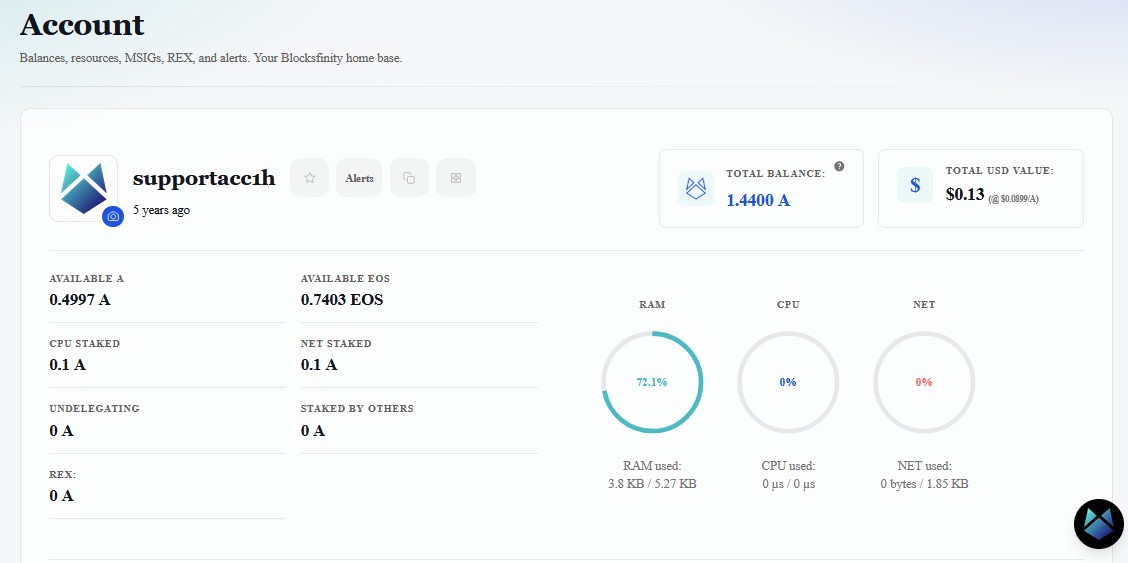
RAM — persistent blockchain storage
RAM is storage for data that needs to remain in the blockchain's current state.
Examples include:
account information and permissions
token balance records
PowerUp orders
smart-contracts and data stored by smart contracts
RAM is displayed in bytes, KB, or MB.
There is an important distinction between RAM used and RAM available. If Blocksfinity shows:
3.8 KB / 5.27 KB
the account is currently using about 3.8 KB out of a total allocation of about 5.27 KB.
CPU — computation
CPU is the processing time required to execute transactions and smart-contract code.
Vaulta measures CPU in microseconds (µs) and milliseconds (ms).
A simple token transfer normally requires less CPU than a complicated smart-contract transaction.
1 ms = 1,000 µs
So an account showing approximately 6.34 ms of CPU has roughly 6,340 µs of CPU capacity available under the current resource allocation.
NET — network bandwidth
NET represents the network/storage bandwidth consumed by the serialized transaction itself.
Larger transactions — for example, transactions containing more actions or more data — generally consume more NET.
What happens if you do not have enough CPU or NET?
A transaction needs sufficient CPU and NET resources to execute. If the required resources are unavailable, the network can reject the transaction.
However, the account performing an action does not always have to supply those resources itself.
Vaulta supports a resource-provider pattern in which another account sponsors the CPU and NET for a transaction. A lightweight noop action can be placed first in the transaction so that the resource provider becomes the account billed for the transaction's CPU and NET. WharfKit
This is visible later in the Blocksfinity signing screen:
core.vaulta::noop · CPU/NET cover
That action does not transfer your tokens. Its purpose is to help provide the transaction's network resources.
Key idea: Your account can authorize a transaction while another account provides the CPU and NET needed to execute it.
This is especially useful for bootstrapping an account that has almost no CPU. PowerUp is itself a blockchain transaction, so an account with no usable CPU may need a resource provider to help execute the transaction that obtains more CPU.
Blocksfinity supports this resource-covering pattern for supported flows, which is why an account displaying little or no CPU/NET may still be able to perform actions through Blocksfinity. Resource sponsorship should not be treated as a guarantee for every transaction or security mode.
1. Understand the old CPU/NET allocation model
Open Blocksfinity Wallet → Allocate
https://www.blocksfinity.com/wallet/allocate
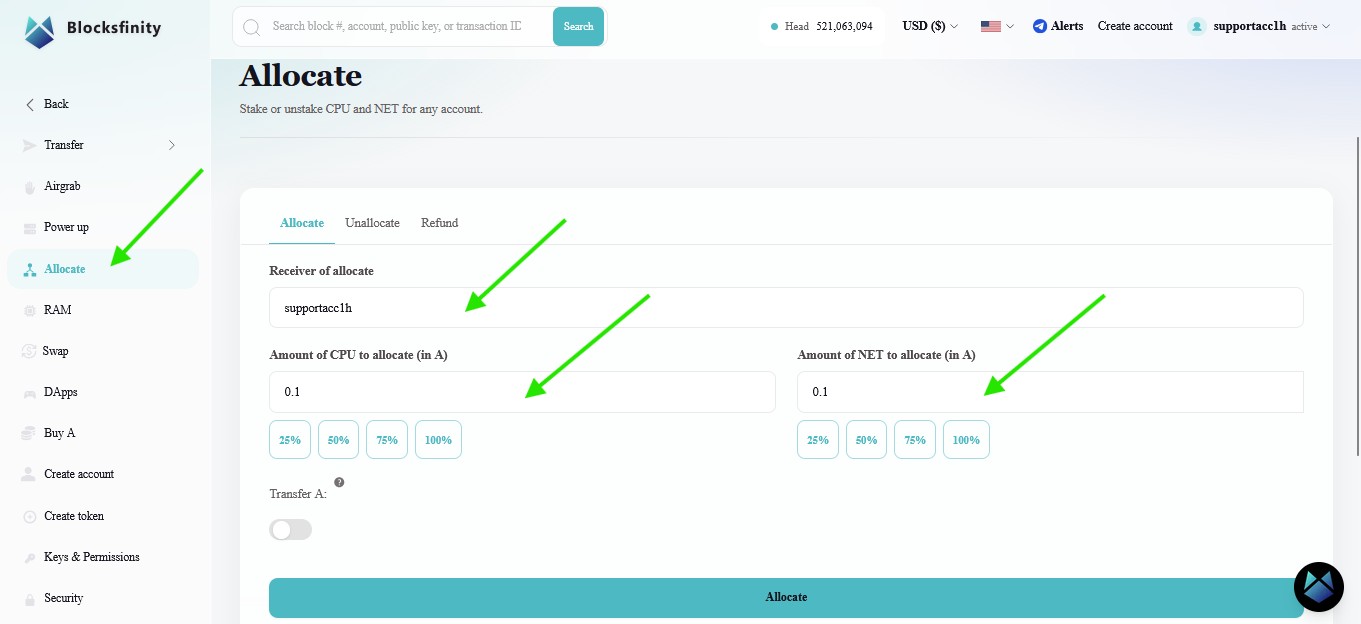
Vaulta inherited its original resource model from EOS.
Under that model, users staked (allocated) tokens ($EOS, $A) to CPU and NET. The more tokens an account had staked relative to everybody else, the larger its share of network CPU and NET.
The user did not normally pay a separate fee for each transaction. Instead, tokens were locked in order to reserve a share of network resources.
This created an important inefficiency: resources could remain allocated to accounts that were not actually using them, while active users could have difficulty obtaining sufficient resources. The PowerUp model was introduced as a time-limited resource market so CPU and NET could be allocated more dynamically to accounts that actually needed them.
Allocating to CPU/NET still exists — but it is not an efficient way to obtain CPU/NET
The account has:
0.1 Astaked to CPU;0.1 Astaked to NET.
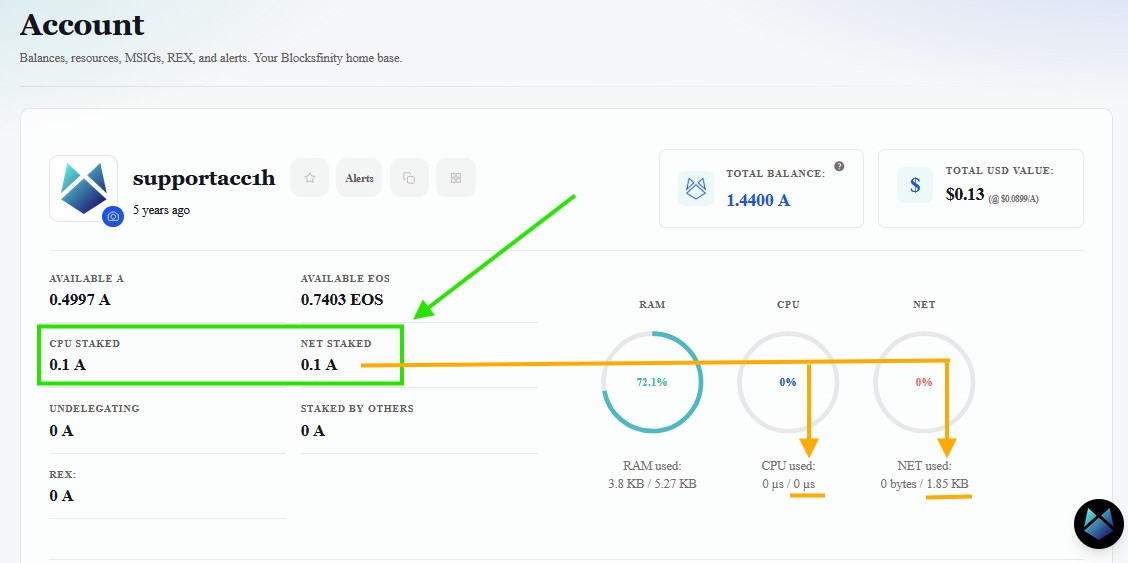
Yet Blocksfinity shows approximately:
CPU used: 0 µs / 0 µs
and only a small NET allocation.
Nothing is broken. The legacy allocation model has been heavily diluted by the transition to the PowerUp model.
Vaulta still exposes the allocation functionality and current Vaulta system-contract releases use $A for the allocation, but its highly inefficient. Especially for CPU.
PowerUp is the practical mechanism for temporarily obtaining CPU and NET capacity.
2. Power up your account
Open Wallet → Power up.
https://www.blocksfinity.com/wallet/rent
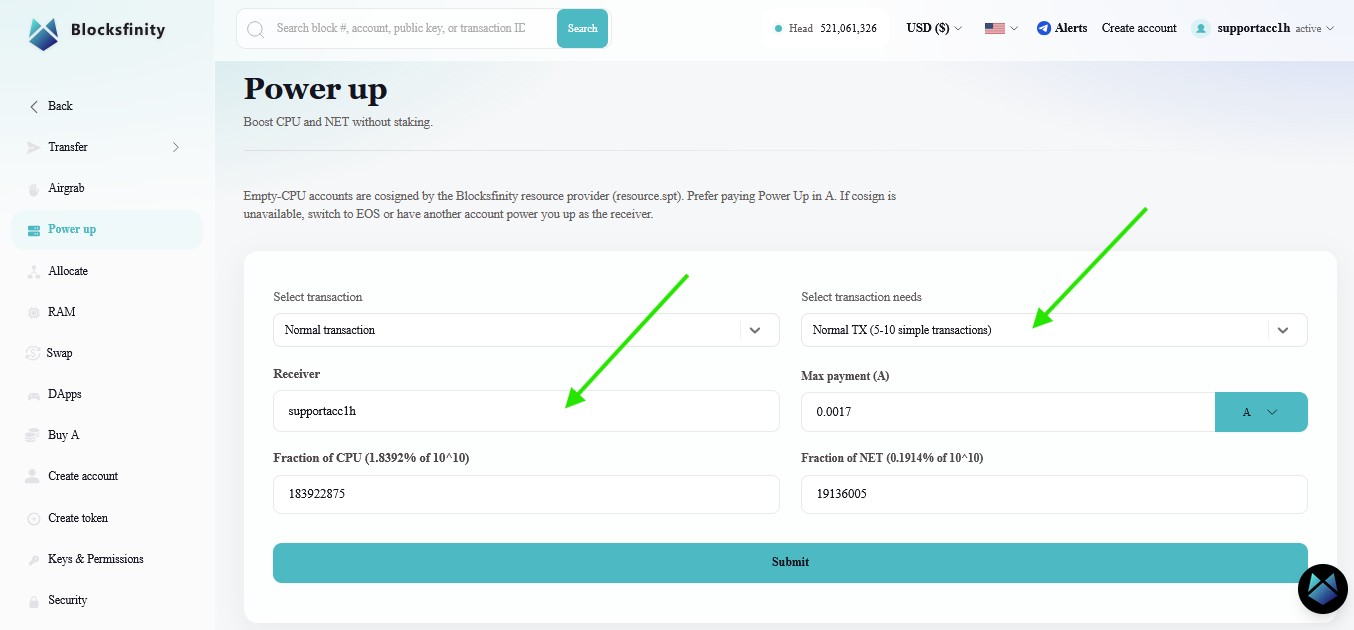
Select your account as the receiver.
Blocksfinity provides presets such as:
Normal TX — approximately 1–2 simple transactions;
Normal TX — approximately 5–10 simple transactions;
Normal TX — approximately 10–20 simple transactions.
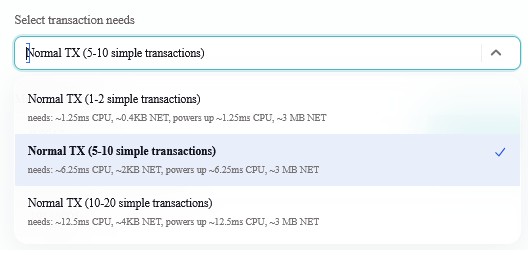
These are estimates, not guarantees.
A transaction's actual CPU requirement depends on what code executes, while its NET requirement depends on the amount of transaction data. The price of obtaining a given PowerUp allocation also depends on the current PowerUp market state and utilization. The system contract calculates the resource allocation and fee using the current market state rather than a permanently fixed “A per millisecond” price. GitHub
Therefore:
“5–10 simple transactions” means approximately enough resources for transactions similar to the assumptions used by Blocksfinity at that moment.
It does not mean the account is guaranteed exactly ten transactions.
What are cpu_frac and net_frac?
PowerUp does not directly request “6 milliseconds” or “3 MB” from the system contract.
Internally, it requests fractions of the CPU and NET PowerUp resource markets.
The underlying Vaulta/Antelope system contract represents 100% using a fixed-point value of: 10^15
and converts the requested fraction into resource weight using the current market state. GitHub
What does Max payment mean?
In the example, Blocksfinity shows:
Max payment: 0.0017 A
This is a spending ceiling, not necessarily the exact final fee.
The PowerUp system calculates the fee from the requested resource amount and current market state. If the calculated fee exceeds max_payment, the transaction fails instead of spending more than the authorized maximum.
How long does PowerUp last?
Vaulta's current PowerUp configuration uses a one-day PowerUp period. If the ressources were not used within the time window, they will be lost after 24 hours and the account has to be “powered up” again.
Review before submitting
Checkpoint: Before approving the PowerUp, confirm the receiver account, estimated resource level, duration, CPU/NET values, and
Max payment.
Press Submit.
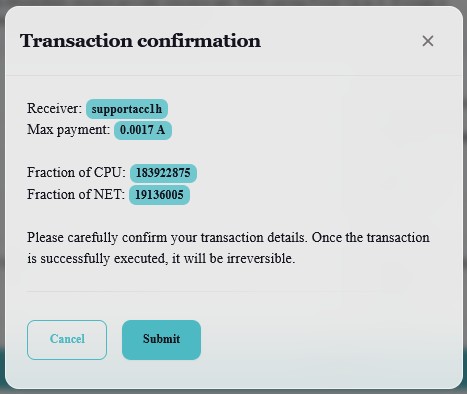
Review the transaction confirmation.
Then open the Blocksfinity Authenticator signing request.
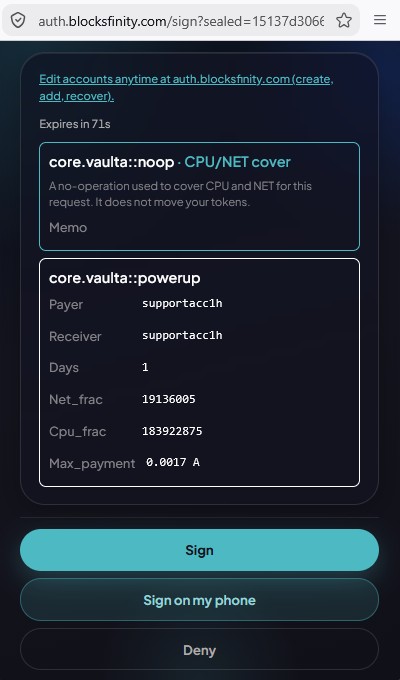
Notice that the signing request shows both:
core.vaulta::noop · CPU/NET cover
and:
core.vaulta::powerup
The first action supplies the resource-cover mechanism for this transaction in case your account has no ressouces yet to execute that transaction. The second performs the PowerUp.
The PowerUp request also shows:
payer;
receiver;
duration;
net_frac;cpu_frac;maximum payment.
Only sign after confirming those values.
3. Verify that CPU and NET increased
Return to your account page after the transaction has been confirmed.
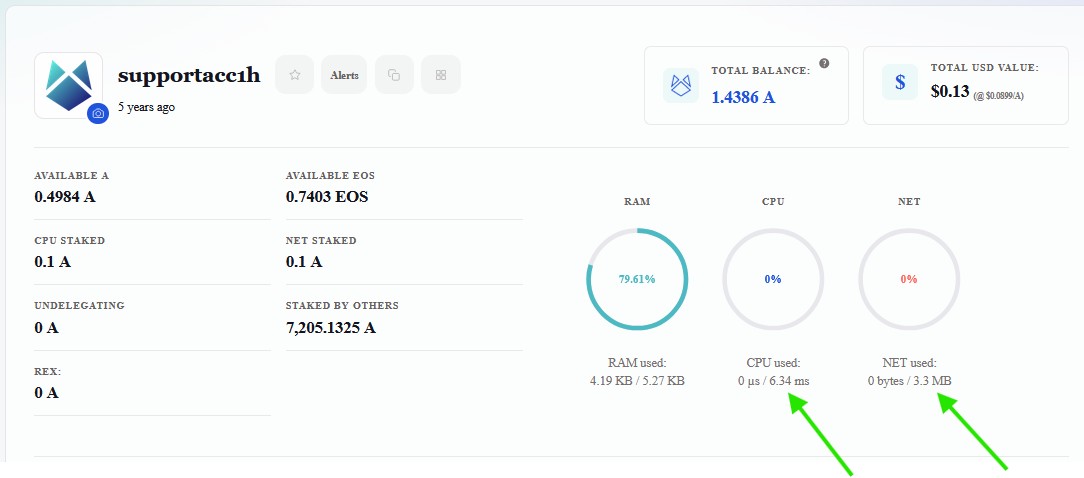
Before PowerUp, the example account displayed effectively no usable CPU.
Afterward, it displays approximately:
CPU: 6.34 ms
NET: 3.3 MB
That is the visible result of the PowerUp.
You did not buy permanent CPU hardware or permanently increase the network's capacity. You temporarily obtained a larger share of the network's CPU and NET resource allocation.
Why did RAM usage also increase?
PowerUp itself needs a small amount of RAM.
The system contract creates a persistent powup.order record containing information such as the receiver, CPU allocation, NET allocation, and expiration time. GitHub
A recent live Vaulta PowerUp transaction recorded 405 bytes of RAM usage, which is a useful real-world reference point, although it should not be treated as a permanent guaranteed byte count for every future implementation.
Once an expired PowerUp order is processed, its temporary on-chain record is removed. The RAM it used is then freed and becomes available to the payer again.
4. Buy additional RAM
Now open Wallet → RAM and select Buy RAM.
https://www.blocksfinity.com/wallet/ram
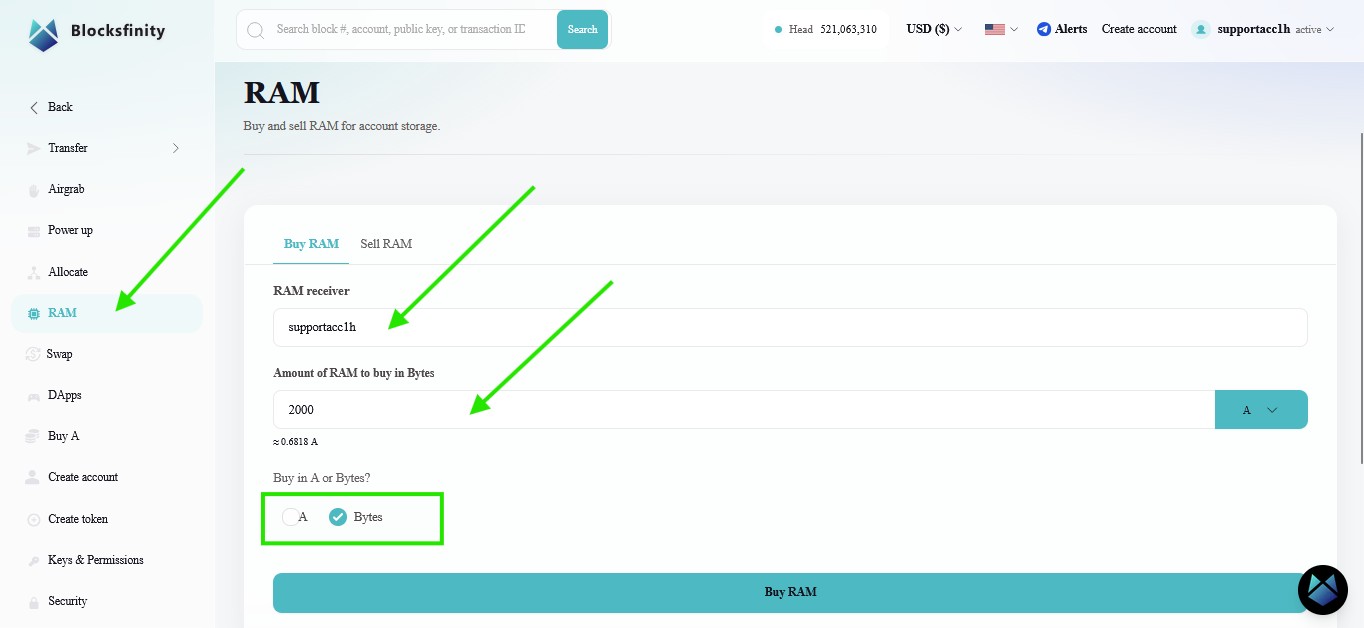
RAM is different from CPU and NET.
PowerUp gives you temporary CPU and NET capacity.
Buying RAM gives the receiver additional persistent storage capacity. RAM is acquired through the system RAM market and remains allocated until it is later sold or otherwise transferred according to the system's rules.
For this exercise:
Confirm the RAM receiver is your account.
Select Bytes.
Enter
2000.Review the estimated $A required.
Press Buy RAM.
Review the signing request.
Sign only after confirming the receiver and amount.
Important: Buying 2,000 bytes increases your RAM capacity. It does not mean your account immediately starts using 2,000 additional bytes.
Why do you need RAM?
RAM becomes necessary whenever something needs to create or enlarge persistent blockchain state.
Receiving a token for the first time
A token balance is stored as a database row.
For the standard token contract, one balance row is documented as costing approximately 240 bytes of RAM. If the recipient does not yet have a row for that token, the first sender normally pays to create it.
Vaulta's current migration documentation separately recommends having 241 bytes available for the first A transfer, reflecting the Vaulta token's implementation.
A standard token balance needs roughly a few hundred bytes of RAM, but the exact amount depends on the token contract.
Using applications
A DApp may need to create persistent rows for things such as:
an order;
a profile;
a configuration;
a deposit record;
a game item;
a vote or proposal;
other smart-contract state.
Who pays that RAM depends on how the smart contract was designed.
Account and permission information
Accounts, authorities, permissions, and similar persistent account data also occupy blockchain state.
This matters when performing operations such as creating accounts or modifying account permissions.
Deploying your own smart contract
Contract developers need considerably more RAM.
Antelope's node implementation currently bills smart-contract WASM code at 10 times its compiled code size to account for the additional internal storage and compiled representations. GitHub
For example, a compiled WASM file of approximately:
10 KB
can therefore require approximately:
100 KB
of RAM for the code component alone.
The ABI, account state, and any database tables created by the contract require additional RAM.
So:
“About 100 KB for a small smart contract” is a reasonable example, but not a rule.
5. Verify your new RAM allocation
Return to the account overview.
https://www.blocksfinity.com/account
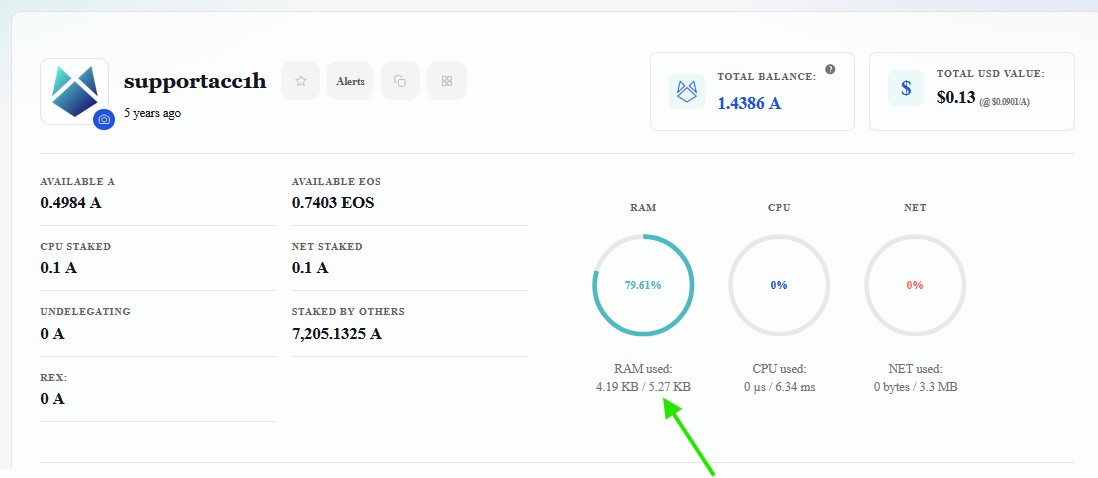
Notice what changed:
The limit should have increased. The used amount did not.
That is the distinction between owning/allocating RAM and actually storing something in that RAM.
Later, if a smart contract creates another database row, the used amount may increase.
Key idea: RAM is storage capacity. Buying it creates room for future blockchain state; it does not itself fill that space.
What just happened?
In this mission you did more than click resource buttons:
You inspected your account's RAM, CPU, and NET.
You saw that legacy CPU/NET allocation model can produce negligible transaction capacity under today's resource model.
Blocksfinity prepared a PowerUp transaction requesting temporary CPU and NET.
A CPU/NET-cover action demonstrated how a resource provider can sponsor the execution cost of a transaction.
Your Blocksfinity Authenticator signed the transaction.
The Vaulta blockchain temporarily increased your CPU and NET allocation.
The PowerUp also created a small temporary on-chain record that consumed RAM.
You bought 2,000 additional bytes of RAM.
Blocksfinity then showed that your RAM capacity increased while your RAM usage stayed almost unchanged.
The three resources should now have distinct meanings for you:
RAM → persistent blockchain storage
CPU → transaction computation
NET → transaction bandwidth
Key idea: CPU and NET let you do things. RAM lets the blockchain remember things.
What you should remember
CPU measures execution time and is normally displayed in µs or ms.
NET measures transaction bandwidth and is displayed in bytes, KB, or MB.
RAM stores persistent blockchain state and is also displayed in bytes, KB, or MB.
Legacy CPU/NET allocation still exists, but PowerUp is the practical mechanism for temporary transaction resources.
PowerUp resources expire; purchased RAM does not expire in the same way.
A resource provider can sponsor CPU/NET for a transaction without taking control of your account or moving your tokens.
Buying RAM increases your capacity; creating blockchain data increases your RAM usage.
Raw PowerUp fraction numbers are implementation details. End users should focus on estimated capacity, duration, and maximum payment.
Quick Quiz
1. What is RAM primarily used for on Vaulta?
A. Persistent blockchain data
B. Encrypting your private key
C. Internet bandwidth between your computer and Blocksfinity
D. Increasing the number of A tokens in your account
2. Your account has 0.1 A staked to CPU but Blocksfinity shows approximately 0 µs available. What is the best explanation?
A. The private key is damaged.
B. RAM has disabled CPU.
C. The legacy “staking” allocation is now heavily diluted and is not an efficient way to obtain transaction CPU.
D. A tokens cannot be used with Vaulta resources.
3. What does Max payment mean in a PowerUp transaction?
A. The exact amount that must always be spent.
B. The maximum amount the payer authorizes PowerUp to spend.
C. The account's total A balance.
D. The price of one millisecond of CPU forever.
4. Why can a PowerUp temporarily consume RAM?
A. CPU is physically converted into RAM.
B. The system stores a PowerUp order containing resource and expiration information.
C. Every signature permanently requires 1 KB of RAM.
D. NET is stored inside RAM after every transaction.
5. You buy 2,000 bytes of RAM. What should happen immediately?
A. RAM used must increase by exactly 2,000 bytes.
B. CPU increases by 2,000 µs.
C. NET increases by 2,000 bytes.
D. Your RAM capacity increases by approximately 2,000 bytes, while RAM usage may remain unchanged.
Answer footnote: Q1:1; Q2:3; Q3:2; Q4:2; Q5:4.
Last updated:
Was this article helpful?
Have a specific question about this article?